Modern businesses generate enormous amounts of data every day. Sales teams collect customer information, marketing teams track campaigns, customer support teams solve issues, and finance departments manage invoices and payments.
The problem?
Many businesses store this information in separate systems. As a result, employees waste time searching for data, customers receive inconsistent experiences, and decision-makers struggle to gain a complete view of operations.
This is where ERP (Enterprise Resource Planning) and CRM (Customer Relationship Management) integration becomes a game-changer.
When ERP and CRM work together, businesses can connect customer-facing activities with internal operations, creating a single source of truth across the organization.
In this guide, you'll learn:
(A) What ERP and CRM are
(B) How ERP integrates with CRM
(C) Key benefits of integration
(D) Real-world examples
(E) Common challenges
(F) Step-by-step implementation process
(G) Future trends in ERP-CRM integration
ERP stands for Enterprise Resource Planning.
It is software designed to manage and automate core business processes such as:
1. Finance
2. Accounting
3. Inventory Management
4. Procurement
5. Human Resources
6. Manufacturing
7. Supply Chain Management
Think of ERP as the "backbone" of a company.
It helps organizations manage internal operations efficiently.
CRM stands for Customer Relationship Management.
CRM software focuses on managing customer interactions and improving relationships.
Key CRM functions include:
1. Lead management
2. Sales tracking
3. Customer communication
4. Marketing automation
5. Customer support
6. Contact management
Think of CRM as the "customer-facing brain" of a business.
Popular CRM platforms include:
1. Salesforce
2. Zoho CRM
3. HubSpot CRM
4. Microsoft Dynamics CRM
5. Freshsales
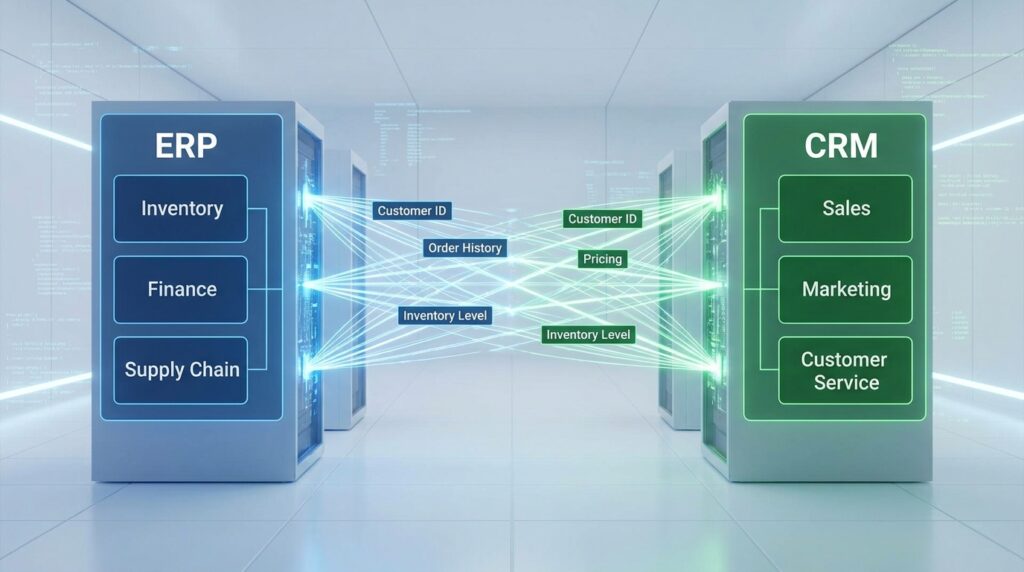
ERP and CRM integration connects both systems so information flows automatically between them.
Instead of manually entering the same data into multiple systems, information is synchronized in real-time.
Data Flow Example
A customer places an order.
CRM captures:
1. Customer details
2. Sales history
3. Communication records
ERP captures:
1. Inventory availability
2. Billing information
3. Shipping details
4. Payment status
Once integrated:
1. Sales data moves from CRM to ERP.
2. Inventory information moves from ERP to CRM.
3. Customer service accesses complete records.
4. Finance teams receive updated transaction data.
Everyone works from the same information.
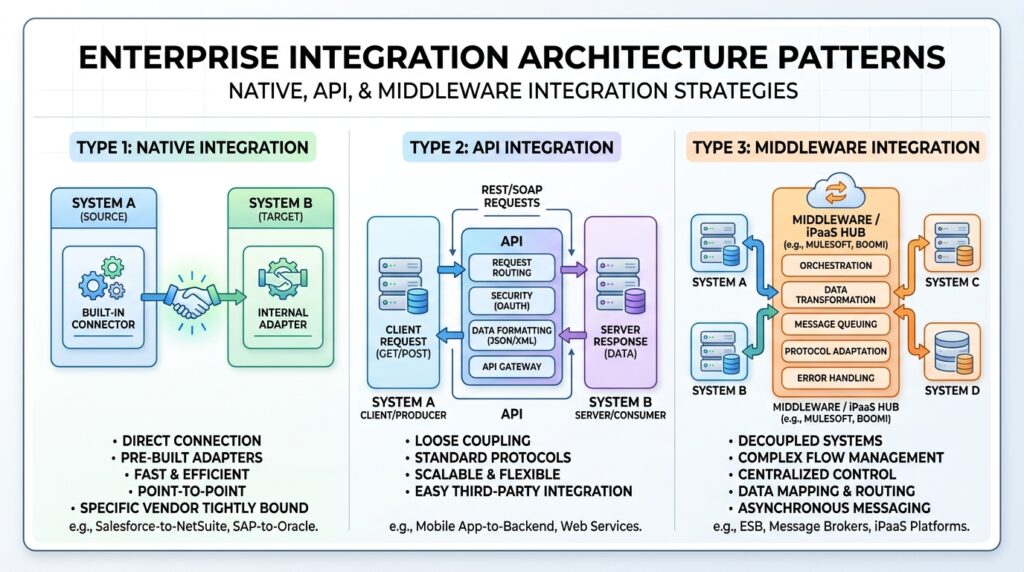
There are multiple ways to integrate ERP and CRM systems.
Method 1: Native Integration
Some software vendors provide built-in integration.
Advantages:
1. Easier setup
2. Lower maintenance
Disadvantages:
1. Limited customization
Method 2: API Integration
APIs connect systems and enable data exchange.
Advantages:
1. Flexible
2. Scalable
Disadvantages:
1. Requires technical expertise
Method 3: Middleware Integration
Middleware acts as a bridge between ERP and CRM.
Advantages:
1. Supports multiple systems
2. Centralized management
Disadvantages:
1. Additional cost
Follow this proven process.
Step 1: Define Goals
Ask:
1. What problems are we solving?
2. Which departments need integration?
Step 2: Audit Existing Systems
Evaluate:
1. Current software
2. Data quality
3. Technical infrastructure
Step 3: Choose Integration Method
Select:
1. Native integration
2. API integration
3. Middleware solution
Step 4: Clean Your Data
Remove:
1. Duplicates
2. Errors
3. Outdated information
Step 5: Test Thoroughly
Run tests to ensure:
1. Accurate synchronization
2. Stable performance
3. Secure data transfer
Step 6: Train Employees
Teach teams how to use the integrated system effectively.
Step 7: Monitor and Optimize
Regularly review:
1. Performance metrics
2. User feedback
3. Business outcomes
Technology continues evolving rapidly.
Several trends are shaping the future.
Artificial Intelligence (AI)
AI helps businesses:
1. Predict customer behavior
2. Automate workflows
3. Improve decision-making
Cloud-Based Integration
Cloud platforms offer:
1. Lower costs
2. Easy scalability
3. Remote accessibility
Predictive Analytics
Businesses can forecast:
1. Customer demand
2. Sales opportunities
3. Market changes
More accurately than ever.
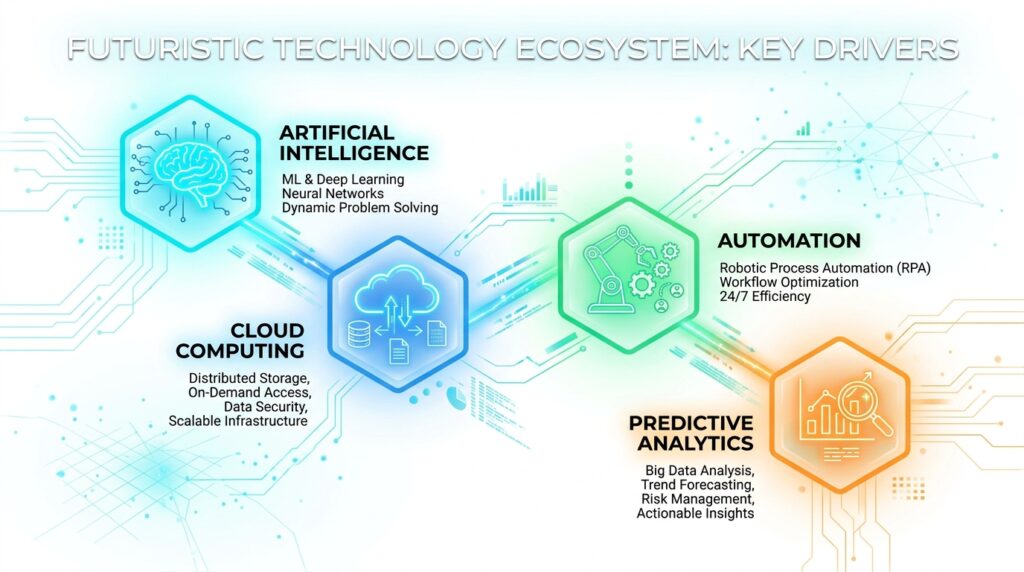
Automation Everywhere
Routine tasks such as:
1. Invoice generation
2. Lead nurturing
3. Order processing
Will become increasingly automated.
Is ERP the same as CRM?
No.
ERP manages internal operations, while CRM manages customer relationships.
Can small businesses benefit from ERP and CRM integration?
Absolutely.
Even small businesses gain efficiency, better customer service, and improved visibility.
How long does integration take?
Depending on complexity, it may take weeks or several months.
Is cloud integration better?
For many businesses, yes.
Cloud solutions are often more flexible and scalable.
Thank You..